Choosing the best interactive presentation tool for running activities during a workshop can make all the difference.
Twenty minutes into most workshops, the room goes quiet. The same two people answer every question. Everyone else nods along and waits for the coffee break.
An interactive presentation tool lets people answer from their phones, and the whole room sees the results on screen a second later.
The hard part is picking one, because the best tool depends on what you want the group to do.
The short answer: For game-style quizzes with points, pick Kahoot. For big events with lots of audience questions, pick Slido. For polished polls in regular company sessions, pick Mentimeter or AhaSlides.
If your groups are large, or you only run a few workshops a year and don't want a yearly contract, look at Slideasy. For visual work like mapping and sticky notes, use a whiteboard such as Miro.
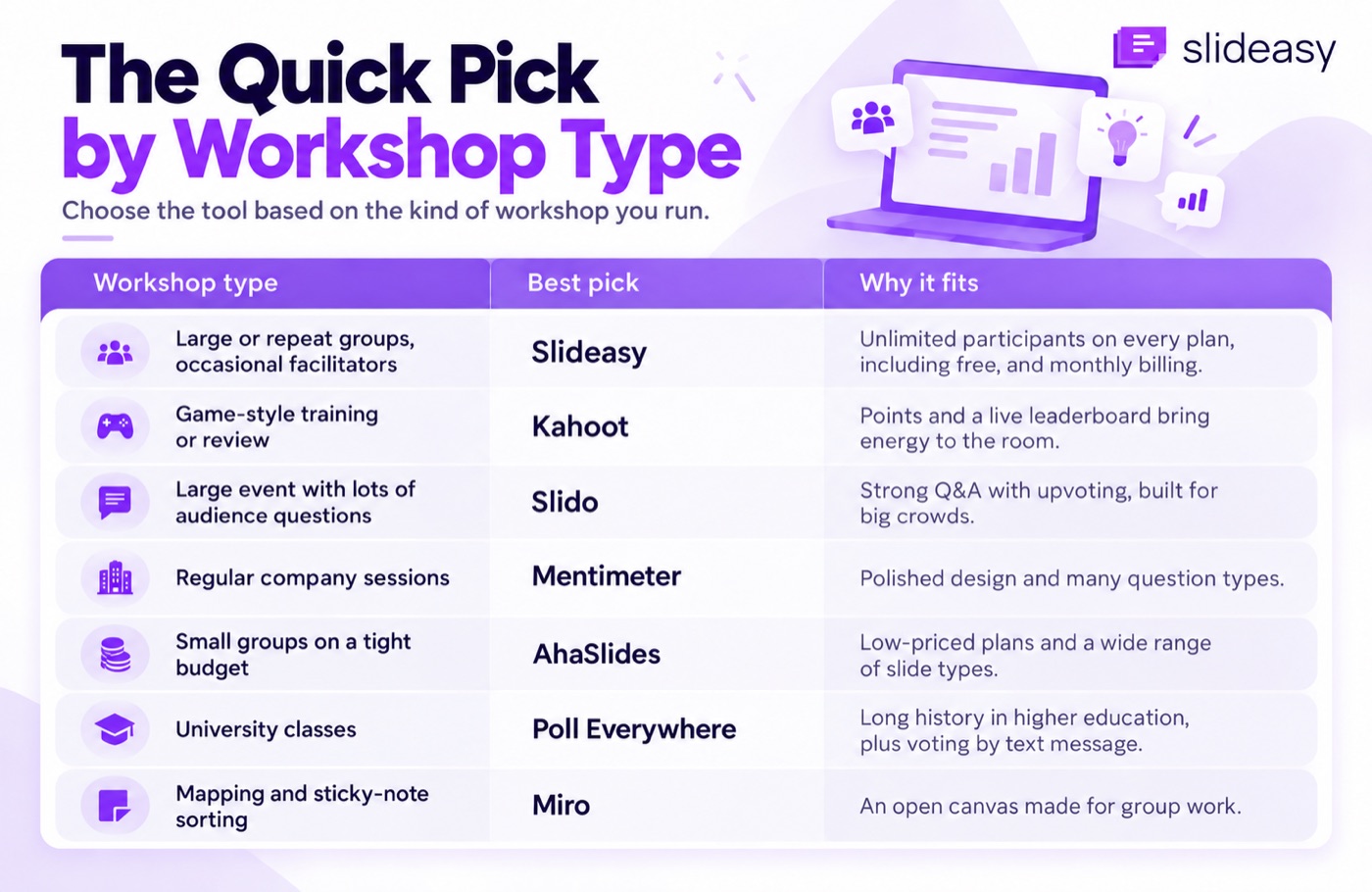
The quick pick by workshop type
Start with the kind of workshop you run. Then check the details further down.
| Workshop type | Best pick | Why it fits |
|---|---|---|
| Large or repeat groups, occasional facilitators | Slideasy | Unlimited participants on every plan, including free, and monthly billing |
| Game-style training or review | Kahoot | Points and a live leaderboard bring energy to the room |
| Large event with lots of audience questions | Slido | Strong Q&A with upvoting, built for big crowds |
| Regular company sessions | Mentimeter | Polished design and many question types |
| Small groups on a tight budget | AhaSlides | Low-priced plans and a wide range of slide types |
| University classes | Poll Everywhere | Long history in higher education, plus voting by text message |
| Mapping and sticky-note sorting | Miro | An open canvas made for group work |
What a workshop needs from an interactive tool
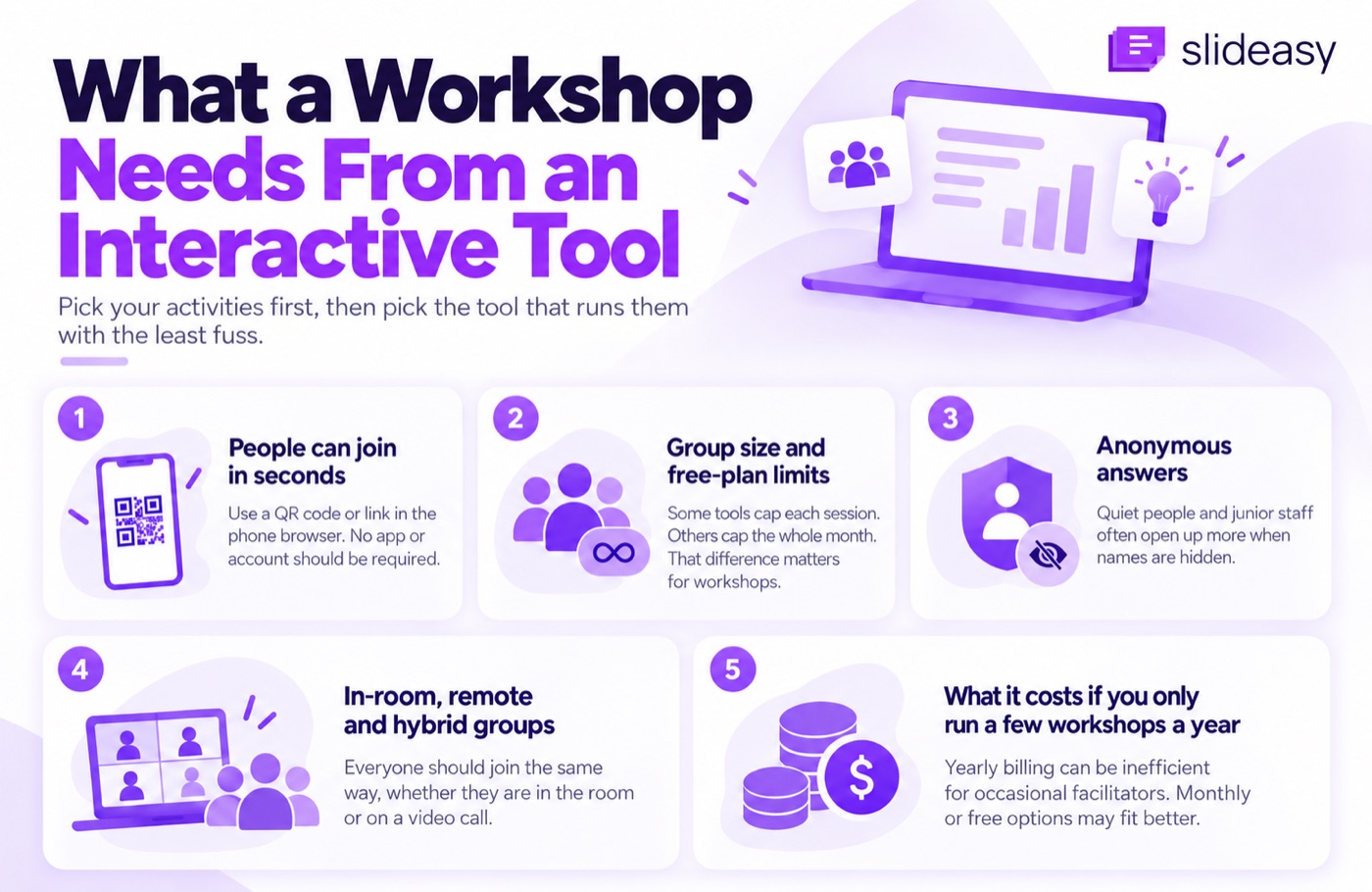
Pick your activities first. Then pick the tool that runs them with the least fuss. Here's what to check before any session.
People can join in seconds
If joining takes more than a few seconds, you lose the room before the first question. Look for a tool where people scan a QR code or open a link in their phone's browser. Nobody should have to install an app or create an account.
Every tool in this article works this way for participants. Still, test the join step on an old phone before the day.
Group size and free-plan limits
Free plans limit you in different ways. Some cap each session. Others cap the whole month. For workshops, that difference matters a lot.
Take a simple case. You run two groups of 30 people in the same month, so 60 people in total. Mentimeter's free plan allows 50 participants a month across all your sessions, and the count resets on the day you signed up.
It won't kick anyone out mid-session. But once you pass 50, you can't start a new live session until the reset.
Slideasy's free plan works the other way around. It has no cap on participants, but it limits you to 3 interactive slides. So the question to ask is simple: does your workshop need more people or more activities?
Anonymous answers
People say more when their name isn't attached. Quiet people and junior staff are the ones who open up most. Check that the tool lets you hide names, especially for questions and open-ended answers.
In-room, remote and hybrid groups
In hybrid sessions, the people on the video call often end up watching instead of joining in. A good tool gives everyone the same way to take part. The people in the room and the people at home open the same link and answer on the same screen.
What it costs if you only run a few workshops a year
Many tools only sell yearly plans. Mentimeter's Basic and Pro plans are billed yearly, and it doesn't sell a single month on those plans. It does offer short conference deals for one-off events.
That works well if you present every week. If you run four workshops a year, you pay for all the months in between too. For comparison, Slideasy's free and monthly plans don't lock you into a year.
A sample workshop agenda, activity by activity
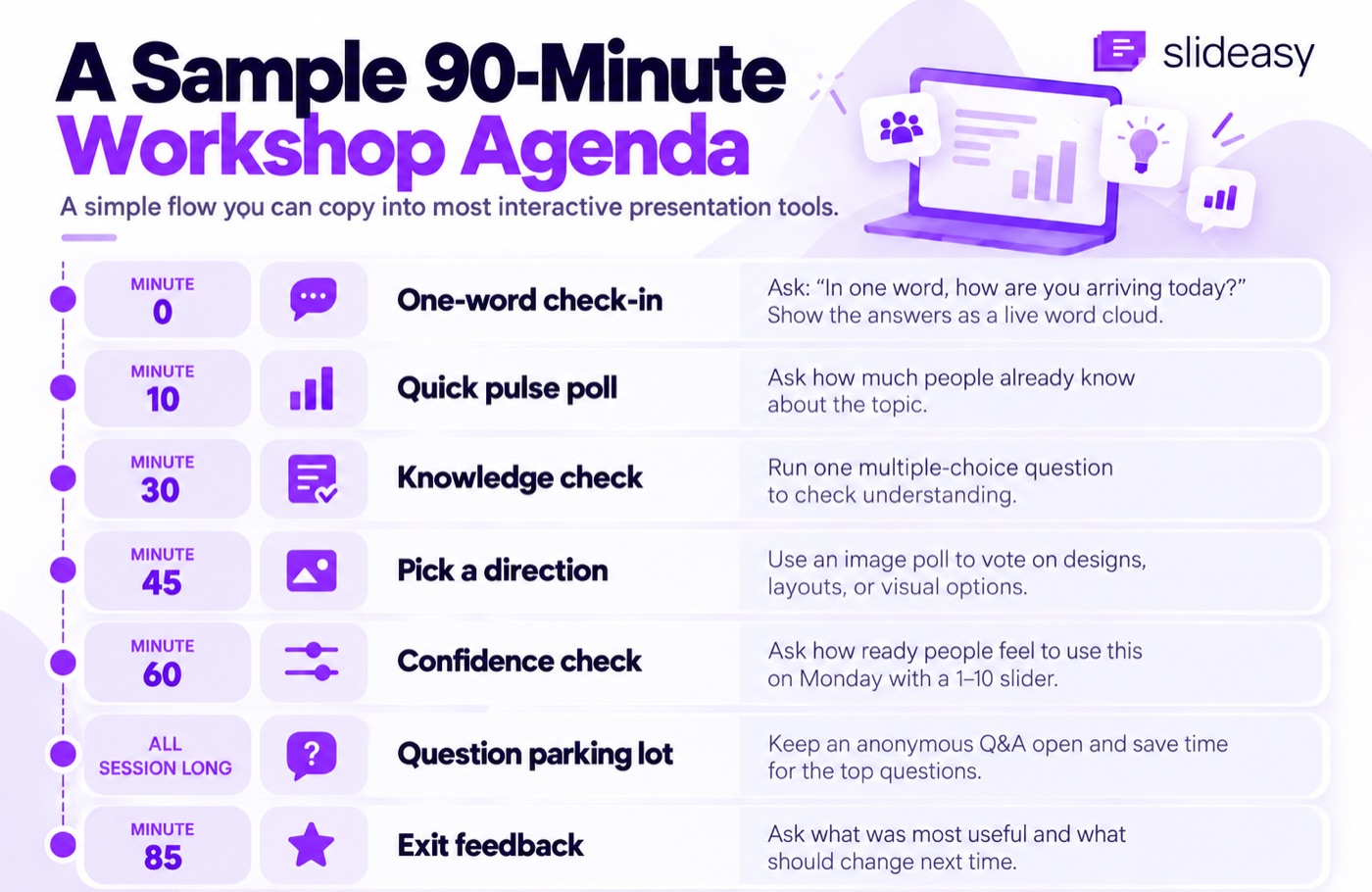
Here is a sample 90-minute flow. You can copy it into most tools on this list. If you want to build it in Slideasy, here's a step-by-step workshop setup.
Minute 0: One-word check-in
Ask, "In one word, how are you arriving today?" Show the answers as a live word cloud. The most common words grow bigger as people answer.
Read a couple of words out loud and react to them. It takes two minutes, and everyone has said something before the real work starts.
Minute 10: Quick pulse poll
Ask, "How much do you already know about today's topic?" Give four options, from "nothing yet" to "I could teach it." Then run a quick live poll and look at the split.
If most people pick the first option, slow down. If most pick the last one, skip the basics. For more prompts like this, here are 60 poll questions sorted by session type.
Minute 30: Knowledge check
Ask one multiple choice question with one right answer. Show the results before you reveal the answer.
Treat it as a check on understanding. Nobody needs a score. If half the room got it wrong, spend five more minutes on that point. You found out now, not after the workshop.
Minute 45: Pick a direction
Show options as pictures and let the group vote. This works well for designs and layouts, or anything people judge by looking. An image poll gets a faster, more honest answer than a long debate.
Minute 60: Confidence check
Ask, "How ready do you feel to use this on Monday?" on a slider scale from 1 to 10.
Look at the spread as well as the average. An average of 7 can hide a group of people sitting at 2 or 3. Those are the people to check in with during the break.
All session long: Question parking lot
Open an anonymous Q&A at the start and leave it open. People send questions whenever they think of them and upvote the ones they care about.
Save the last 10 minutes for the top questions. You'll get questions nobody would have asked out loud.
Minute 85: Exit feedback
Before anyone leaves, run a short feedback survey with two questions. What was most useful? What should change next time?
People are far more likely to answer while they're still in the room than in an email a day later.
The tools, compared honestly
Here's how the main tools stack up for workshops. Free plans and prices change often, so always look at the live pricing page before you buy.
Slideasy
Slideasy does one job. It adds live questions to your session and shows the answers on screen. It has the seven activity types from the agenda above, and everyone joins in their phone's browser with a link or QR code.
Best for: large groups, and facilitators who only run a few workshops a year.
Watch out: there are no game scores or leaderboards, and no AI features. It doesn't plug into PowerPoint or Google Slides, so you run it from its own browser tab. The free plan has 3 interactive slides, so the full agenda above needs Premium.
Pricing: the free plan has unlimited participants and 3 interactive slides. Premium is $9.99 a month with unlimited slides and participants.
Mentimeter
Mentimeter is the tool most people try first. It looks polished and offers many question types.
Best for: facilitators who present every week and want a familiar, clean tool.
Watch out: the free plan's 50 participants a month runs out fast if you run more than one workshop. Paid Basic and Pro plans are sold by the year only. If the monthly cap is your main problem, here are free Mentimeter alternatives compared by participant limits.
Pricing: free plan with 50 participants a month. Basic and Pro are billed yearly, and there are short conference deals for one-off events. Prices can differ by region.
Slido
Slido, owned by Cisco, is built around audience questions. People send questions and vote them up, so the most popular ones rise to the top.
Best for: conferences and town halls, where the audience's questions drive the agenda.
Watch out: the free Basic plan limits how many polls you can run per event. Approving questions before they appear on screen is a paid feature.
Pricing: free Basic plan with up to 100 participants per event and 3 polls. Paid plans are mostly sold by the year.
AhaSlides
AhaSlides feels close to Mentimeter but costs less. It has a long list of slide types, including quizzes with a leaderboard and a spinner wheel.
Best for: trainers on a budget who run smaller groups and want lots of activity types.
Watch out: the free plan allows 50 participants per presentation, plus 5 quiz questions and 3 poll questions. People past the limit can't join, so upgrade before the day.
Pricing: paid plans start at $7.95 a month, and monthly billing is available.
Kahoot
Kahoot turns questions into a game show, with points and a live leaderboard. It's hard to beat for waking up a room.
Best for: energizers and review quizzes, where a bit of competition helps.
Watch out: it's built for games, so it's less suited to open discussion or anonymous feedback. The free plan is small and meant for personal use. Kahoot's help center says free business accounts can only host 3 players in some games.
Pricing (checked September 2026): workshops at work need a paid Kahoot 360 plan, and most of those are billed yearly.
Poll Everywhere
Poll Everywhere is one of the oldest tools in this space. It's big in universities, and people can vote by text message if they don't have mobile data.
Best for: university classes and presenters who want polls to live inside their existing slides.
Watch out: the free plan accepts 40 responses per poll. After that, the poll locks and stops taking answers.
Pricing: the entry Present plan costs about $120 a year.
Wayground (formerly Quizizz)
Quizizz changed its name to Wayground in 2025. It's strong with teachers and handles both live games and quizzes people take on their own time.
Best for: classrooms and self-paced quizzes.
Watch out: it's built mostly for schools. Workshop-style polls and open Q&A aren't its focus.
Pricing: free for individual teachers. Check the live-session cap on the Wayground plans page, since it has changed since the rebrand.
When you need a whiteboard instead
Some workshop activities need space to move things around. Journey mapping and sticky-note sorting are good examples. For those, Miro or Padlet will serve you better than any tool on this list.
The difference is simple. A presentation tool collects answers and shows them. A whiteboard lets people build something together.
Many facilitators use both. The whiteboard holds the group work, and the polling tool handles quick votes and check-ins. If you only need to collect ideas and vote on them, without mapping them out, a simple brainstorming session in a polling tool is often enough.
How to run activities without losing momentum
The tool matters less than how you use it. These habits help any session run smoothly.
- Get everyone joined early. Put the QR code on screen while people find their seats. By the first activity, the room is already in.
- Space activities out. One every 15 to 20 minutes keeps people awake. Any more and the workshop starts to feel like a quiz show.
- Talk about the results. Pause on the screen and point at something surprising. Ask one person to say more about it.
- Skip questions you won't act on. Every activity should help you decide what to do next. If the answer won't change anything, cut the slide.
- Have a backup plan. If the Wi-Fi drops, ask for a show of hands and keep going.
Frequently asked questions
What's the best free tool for workshop polls?
It depends on your group size. For small groups, the free plans from AhaSlides and Mentimeter cover a lot. For large groups, look for a free plan with a high participant cap or none at all. Slido's free plan allows 100 people per event, and Slideasy's free plan has no cap.
Do participants need an app or an account?
No. With every tool in this article, people can join in their phone's web browser using a link or QR code. Some tools also offer an app, but nobody has to download it.
Can workshop participants answer anonymously?
Yes. Most tools let you hide names, especially for Q&A and open-ended questions. Check the setting before the session starts, because some tools ask for names by default.
Which tool works best for hybrid workshops?
Any tool that runs in the browser works well. Share the link in the video call chat and show the QR code in the room. That way, everyone answers on the same screen.
How many interactive activities should one workshop have?
A good rule of thumb is one every 15 to 20 minutes. For a 90-minute workshop, that's about five to seven activities. Leave time to talk about each result.
Is Mentimeter free for workshops?
Yes, Mentimeter has a free plan. It allows 50 participants a month in total across all your sessions. That covers one small workshop, but regular facilitators usually need a paid plan, which is billed yearly.
Can these tools handle a large group?
Most paid plans handle hundreds of people. On free plans, only a few do. Check whether the cap applies per session or per month before you plan a big event.
The bottom line
The best tool is the one that fits your activities. Plan your agenda first and mark the moments where you need the room's input. Then pick the tool that handles those moments without getting in the way.
If your groups are big, or you only run a few workshops a year, Slideasy is worth trying. You can try the agenda above free, no credit card needed.